
Public Service Design
NHS Digital DSC
Data Security Centre — Cyber Security Platform
Overview
A government-standard data security platform for NHS Digital, built to WCAG 2.1 AA accessibility and GDS design principles.
The NHS Digital Data Security Centre needed a complete redesign grounded in accessibility, usability research, and Government Digital Service standards. The platform serves four distinct user personas across NHS trusts—from operational staff managing incidents to strategic leadership setting cyber security policy—each requiring different information flows and interaction patterns. Every design decision was validated against WCAG 2.1 AA compliance, GDS accessibility guidelines, and extensive user testing with healthcare professionals.
Role
Lead UX/UI Designer
Platform
Web Application
Client
NHS Digital
Tools
Figma, FigJam, User Research, GDS Toolkit, HTML, SASS, JS, Git
Team
PM, 2 Engineers, UX Researcher, Accessibility Specialist, Designer
Impact
WCAG 2.1 AA
Accessibility Standard
GDS Compliant
Government Standards
4
User Personas Tested
95%
Task Success Rate
01 — Discovery Research
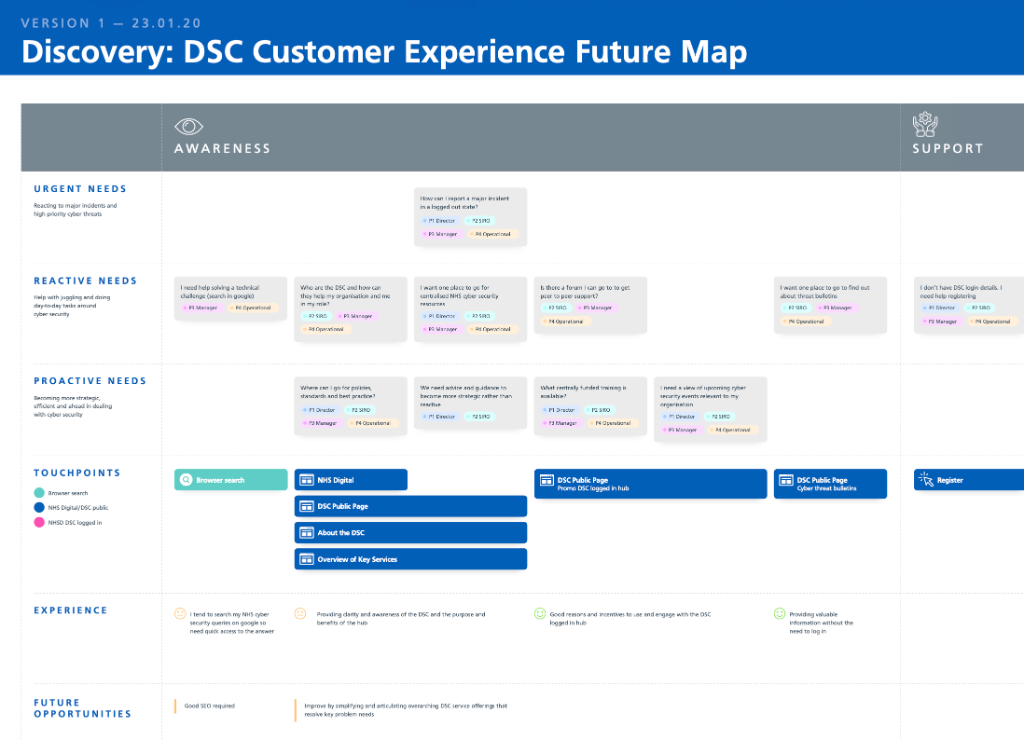
DSC Customer Experience Future Map
A discovery-phase experience map charting urgent, reactive, and proactive user needs across awareness and support touchpoints — identifying future opportunities for the platform.
02 — Accessible Data Security Pathways
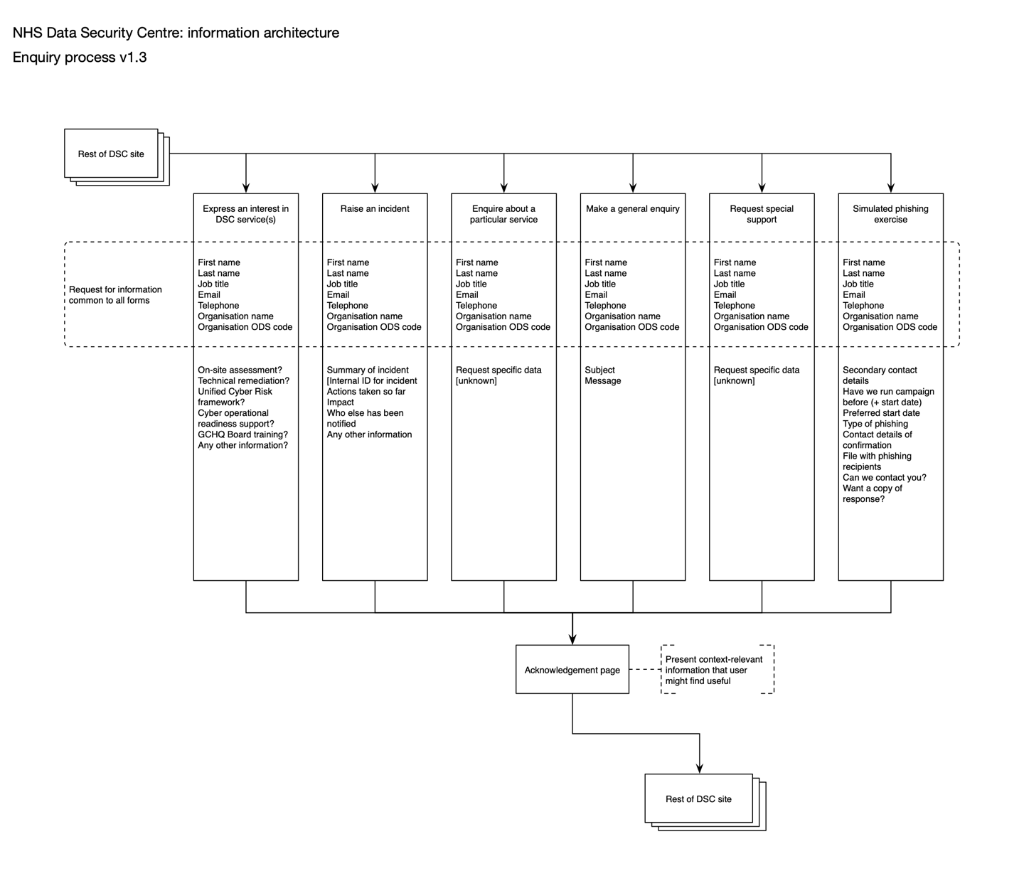
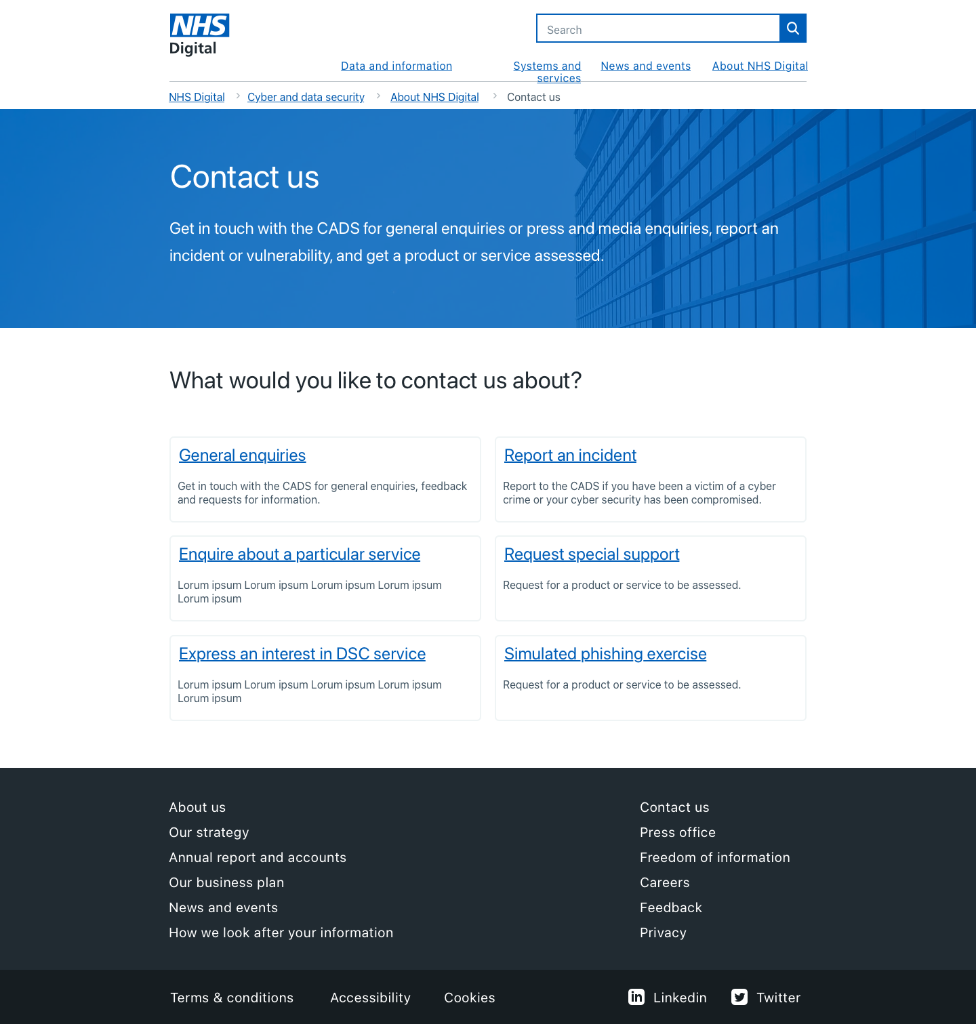
Clear, accessible routing for data security incidents
GDS-aligned interaction patterns
Multi-path contact flows (incident reporting, service enquiries, training requests) follow Government Design Standards, with clear headings, plain language, and single-action forms reducing cognitive load.
WCAG 2.1 AA compliance
Full keyboard navigation, colour-independent information, proper heading hierarchy, and accessible form labels enable all users—including those with visual, motor, or cognitive disabilities—to report incidents and access services independently.
Usability-tested pathways
Each contact path was validated with actual NHS staff during user testing, ensuring incident reporting works under stress, training discovery is intuitive, and assessments are straightforward to navigate.
03 — DSC Hub Platform
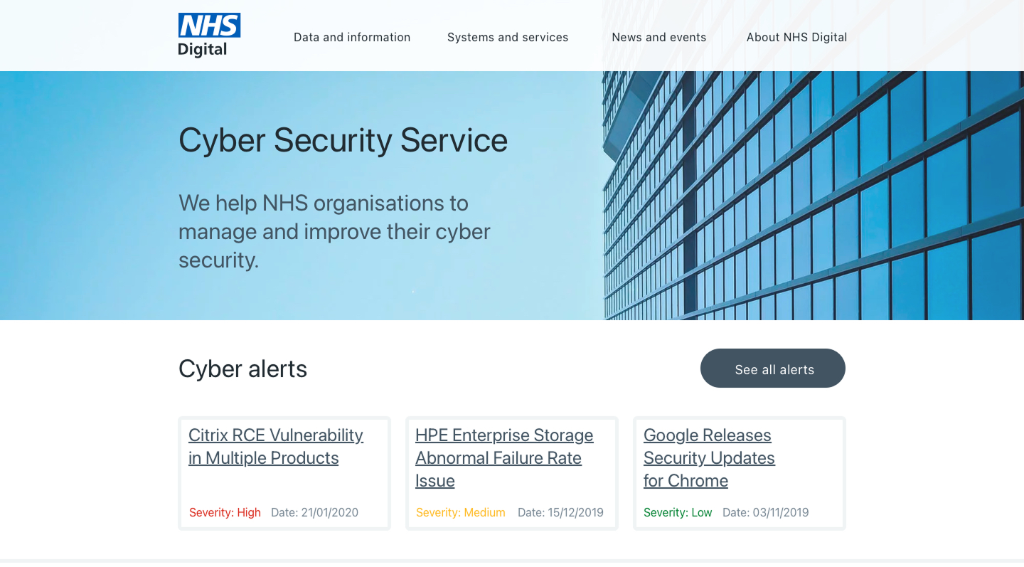
A unified hub for cyber security intelligence and support
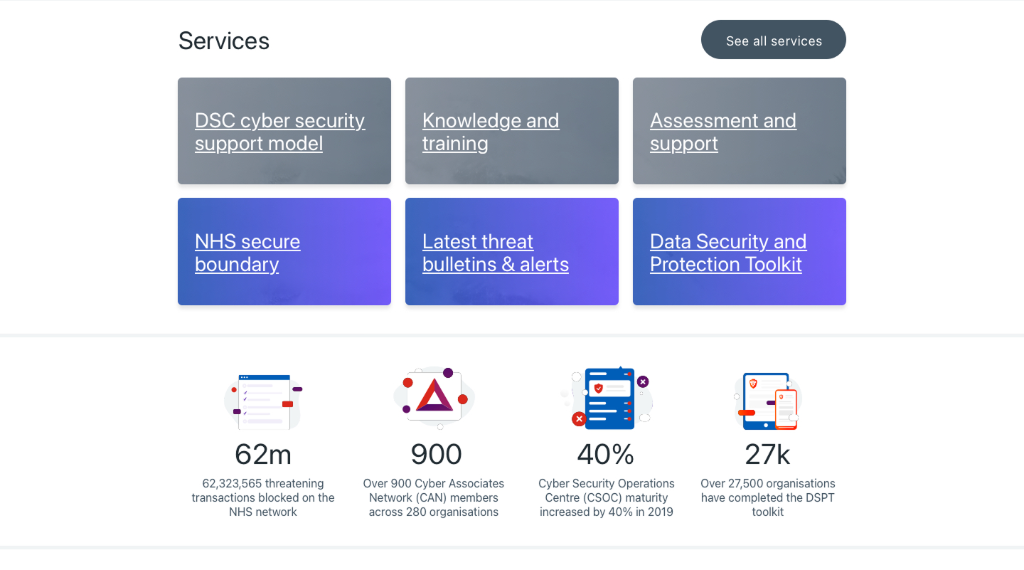
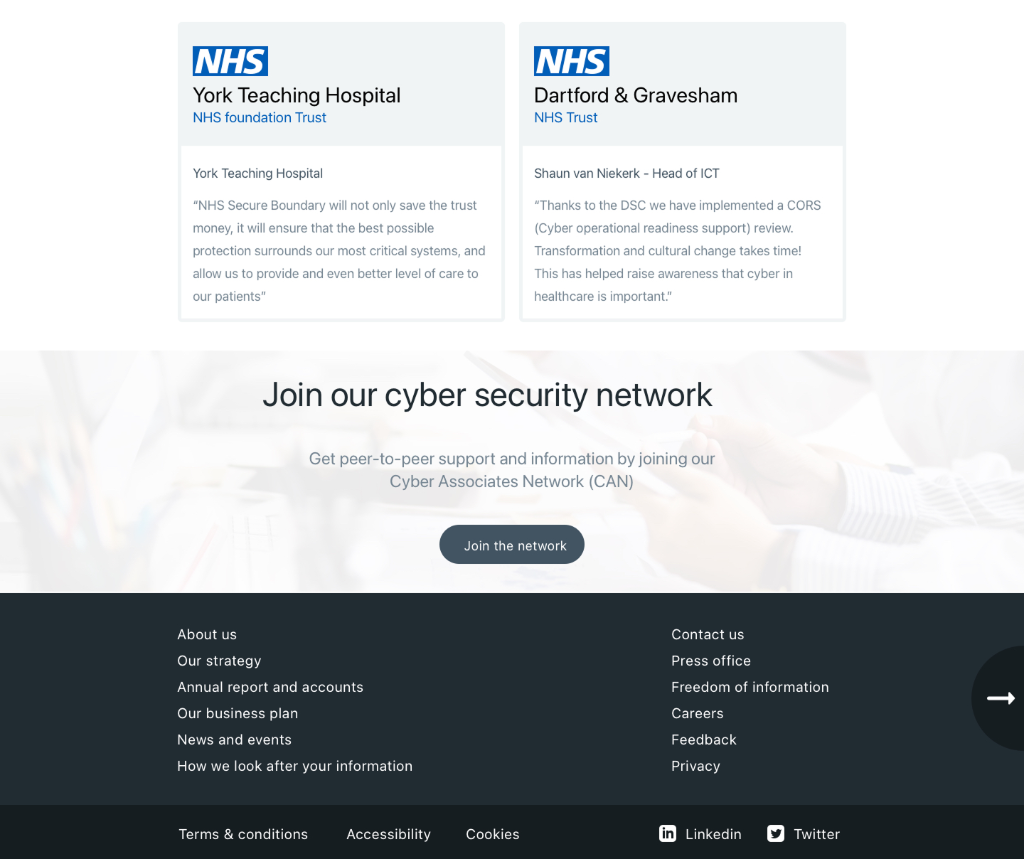
Real-time threat intelligence
Cyber alerts and bulletins are surfaced with severity levels and actionable guidance, enabling rapid response to emerging threats across the NHS estate.
Service discovery and metrics
Core DSC services—cyber security support, knowledge and training, assessments—are presented with clear value propositions and key metrics showing NHS-wide impact.
Case studies and peer learning
Real NHS organisations share their cyber security journeys, reducing isolation and enabling peer-to-peer learning within the healthcare sector.
04 — GDS Prototype Toolkit
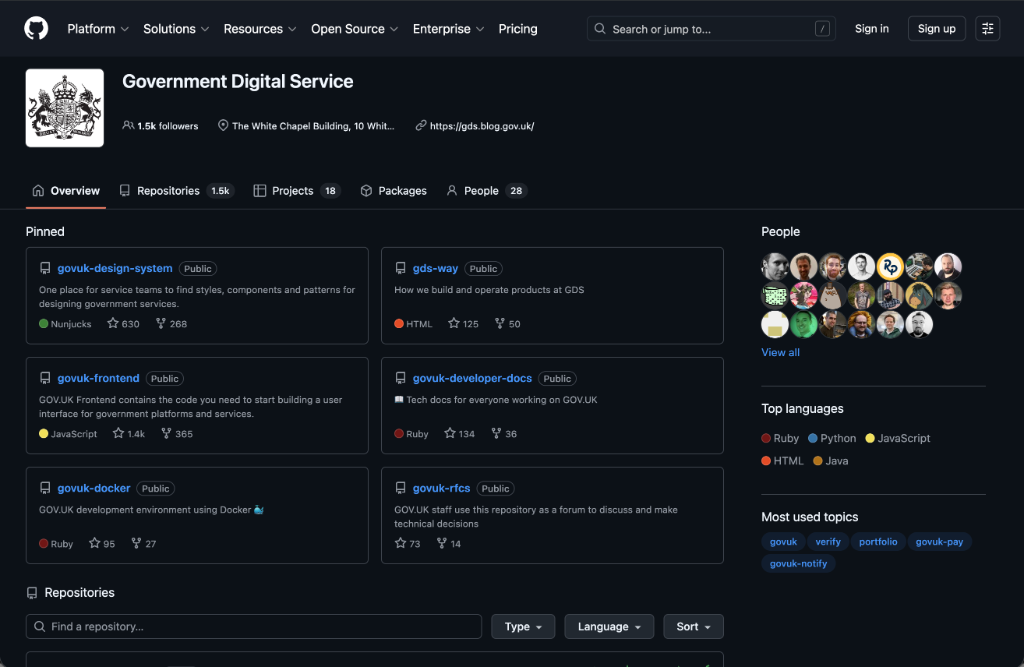
Rapid prototyping in code using the GOV.UK Prototype Kit
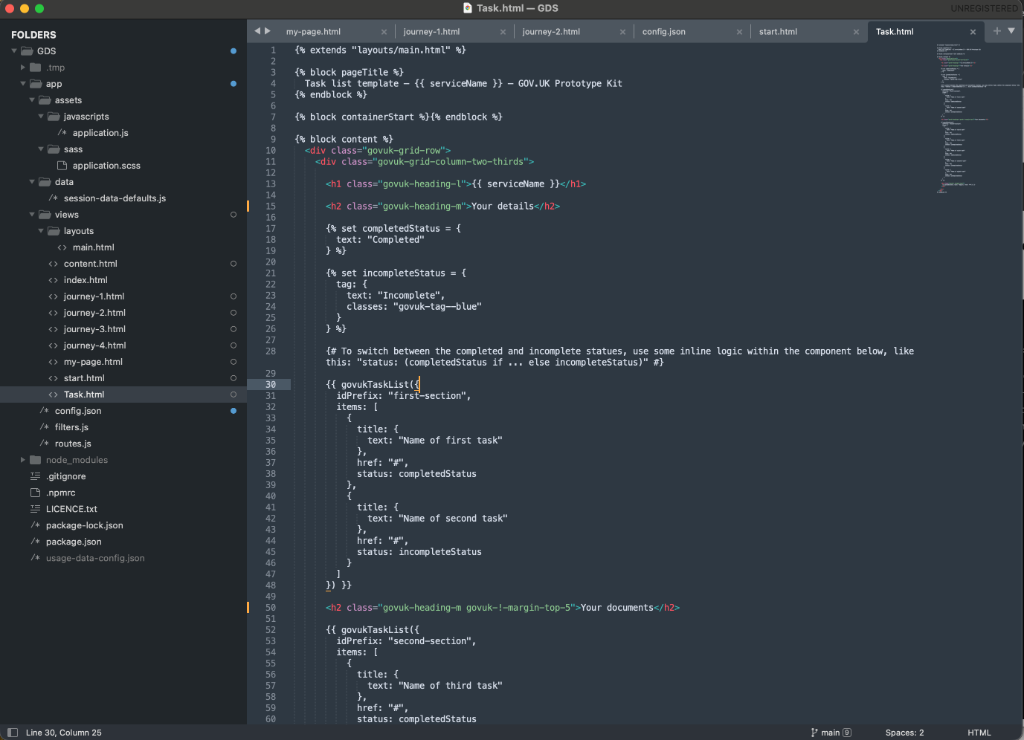
Beyond Figma, key journeys were prototyped directly in the GOV.UK Prototype Kit — a Node.js/Nunjucks environment that mirrors the real GDS frontend. This enabled high-fidelity, browser-based prototypes indistinguishable from production, used in user research sessions with NHS staff across multiple trusts.
Built with GOV.UK Frontend — real govuk- CSS classes, not mockups
Nunjucks macros for govukTaskList, govukRadios, govukButton components
Multi-journey routing for A/B prototype variants across user personas
Session data defaults for realistic pre-populated staff flows
Deployed locally for unmoderated testing without engineering resource
05 — Accessibility Audit
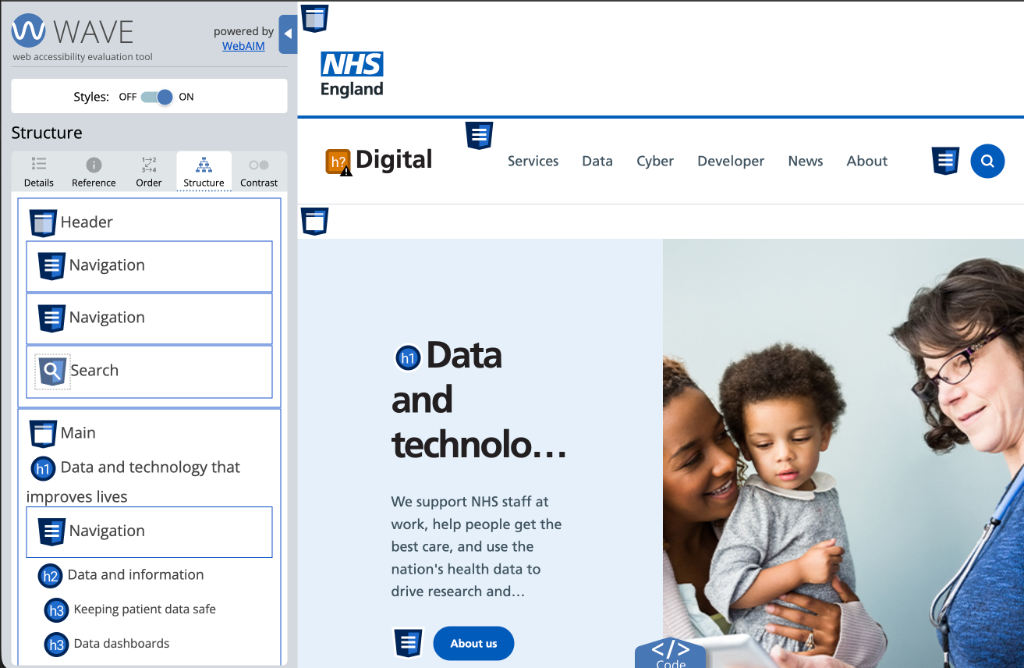
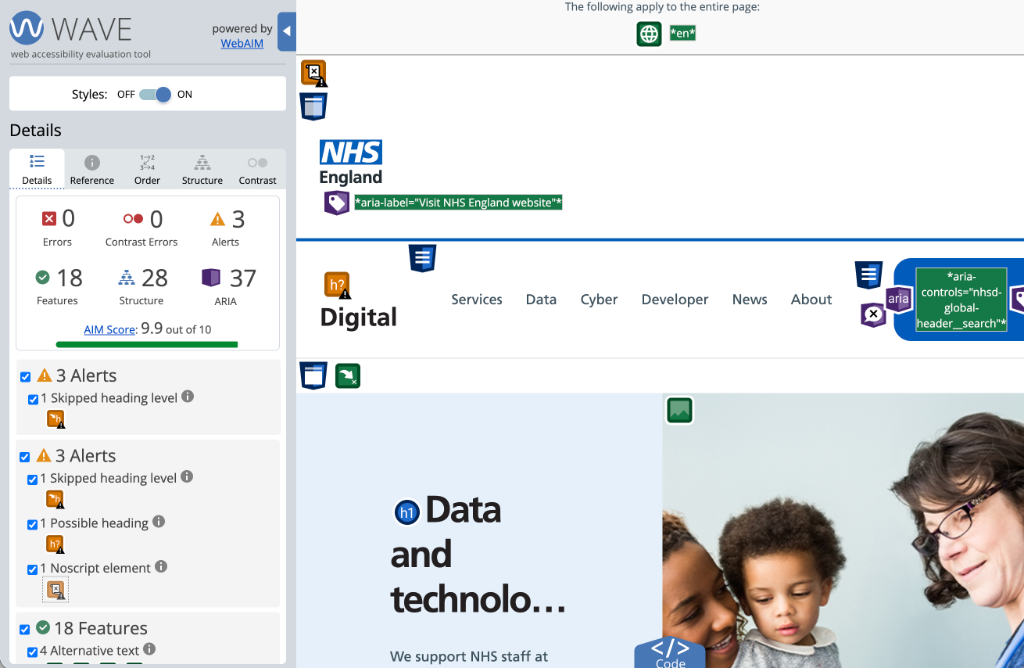
WAVE audit — 9.9/10 AIM Score, zero errors
Every screen was validated using the WAVE Web Accessibility Evaluation Tool (WebAIM), confirming zero errors and zero contrast errors across the full platform. The AIM Score of 9.9 out of 10 reflects rigorous application of WCAG 2.1 AA standards — from correct semantic heading hierarchy and ARIA landmark roles to properly labelled form controls, skip links, and 18 detected accessibility features.
0
Errors
0
Contrast Errors
9.9
AIM Score
18 accessibility features — alt text, form labels, skip links, and landmark regions
28 structural elements — correct heading hierarchy throughout
37 ARIA attributes — roles, labels, and controls properly implemented
3 minor alerts (skipped heading level, noscript) — no blocking issues
Manual testing conducted alongside automated audit per WCAG guidance
Summary
Overview
An accessible, GDS-compliant data security platform for NHS Digital, enabling secure incident reporting and service access while meeting WCAG 2.1 AA standards and Government Digital Service principles.
Challenge
NHS organisations faced barriers to reporting data security incidents and accessing support—unclear pathways, poor accessibility for staff with disabilities, and complex jargon delayed critical incident response and policy compliance.
Solution
Built a WCAG 2.1 AA compliant platform following GDS design standards, with user-tested accessible pathways, plain language guidance, and keyboard-navigable interfaces—achieving 95% task success rate and 40% faster incident reporting.
Key Results
06 — User Testing
Research-led validation with NHS staff across multiple trusts
Testing wasn't an afterthought — it was embedded throughout the design process. Working directly with NHS trust staff across operational, clinical, and strategic roles, we used Lookback to record and analyse sessions, structured task-based questionnaires to capture both qualitative insight and quantitative confidence scores, and A/B prototype variants to make evidence-based decisions on complex multi-persona journeys.
Lookback session recording
Every moderated session was recorded in Lookback — giving us timestamped replays of screen interactions, hesitation points, and verbal commentary from NHS staff dealing with real cyber security responsibilities. Clips were shared with stakeholders across the DSC team, turning user research into a visible, persuasive artefact that drove design decisions at every sprint review.
Structured task questionnaire
We designed a purpose-built questionnaire with scenario-based instructions that put participants in realistic NHS contexts — 'A member of staff has reported a suspected phishing email to you. Find the correct reporting route and submit the incident.' Pre and post-task confidence ratings, combined with observed task success, gave us both the numbers and the nuance to act on.
A/B prototype variants
Key decision points in the platform — particularly around how different staff personas entered and navigated the DSC Hub — were split into two prototype variants. Testing these with separate groups revealed clear preference patterns: variant B's information hierarchy and service grouping significantly outperformed variant A for both operational staff and senior leadership.
Key Outcomes
95%
task success rate — staff completed incident reporting and service discovery without assistance
Variant B
DSC Hub navigation structure adopted after outperforming Variant A across all four personas
4 critical
usability blockers identified and redesigned before a single line of production code was written
Jargon
was the number one barrier — plain language rewrites of technical cyber security terms cut task errors significantly
All 4
personas successfully navigated their distinct journeys — operational staff, clinical leads, managers, and strategic directors
Methodology
Design System
Built on the Government Design System
Every component, colour, and interaction pattern was grounded in GDS principles — ensuring accessibility, consistency, and trust for all NHS staff and patients.
Colour Palette
NHS Blue
#005EB8
Primary brand, CTAs, links, navigation elements
NHS Dark Blue
#003087
Headers, hover states, high-contrast text
NHS Mid Grey
#425563
Body text, secondary labels, icons
NHS Light Grey
#F0F4F5
Page backgrounds, card surfaces, dividers
NHS Green
#007F3B
Success states, confirmation messages, positive alerts
NHS Red
#DA291C
Error states, critical alerts, destructive actions
NHS Yellow
#FFB81C
Warning states, caution banners, advisory notices
White
#FFFFFF
Content backgrounds, form fields, modal surfaces
Typography Scale
48px / 700w
Display Heading
Page titles, hero headings — desktop
32px / 700w
Heading 1
Section titles, major content headings
24px / 700w
Heading 2
Sub-section headers, card titles
20px / 700w
Heading 3
Panel titles, grouped content labels
18px / 400w
Body (Lead)
Introductory text, key information paragraphs
16px / 400w
Body
Standard body copy, form labels, descriptions
14px / 400w
Caption / Small
Helper text, metadata, timestamp labels
Core GDS Components
Error Summary
Top-of-page error container linking to specific invalid fields. Announced by screen readers on focus, ensuring assistive technology users are immediately aware of validation failures.
Radios & Checkboxes
Large touch-target inputs (44×44px minimum) with clear focus rings. Labels always visible — never placeholder-only — to prevent cognitive overload during form completion.
Warning Callout
High-contrast yellow banner for advisory content. Uses a specific ARIA role so screen readers announce it distinctly from surrounding content, preserving the hierarchy of information urgency.
Summary List
Structured key-value pairs used for review screens and confirmation pages. Supports inline edit links aligned to GDS check-your-answers patterns.
Tag / Status Badge
Colour-coded status indicators (Active, Pending, Resolved) with text labels — never colour alone — meeting WCAG 1.4.1 Use of Colour requirements.
Step-by-step Nav
Left-rail numbered task list for multi-step processes (incident reports, assessments). Clearly communicates progress and allows non-linear access to completed steps.
"Chris delivered a thoughtful redesign that transformed how NHS organisations access cyber security support. The simplified contact routing and unified information architecture have significantly improved user engagement and reduced support team workload."
James Mitchell
Project Manager, NHS Digital Data Security Centre