Public Service Design
DVSA
MOT Reminders — Government Digital Service
Overview
A GDS-compliant MOT reminder service for the Driver and Vehicle Standards Agency — enabling millions of vehicle owners to sign up for, manage, and update automated MOT expiry notifications.
The DVSA MOT Reminders service needed a complete end-to-end user journey redesign, from the GOV.UK start page through vehicle registration capture, email confirmation, and subscription management — including single and multiple vehicle flows, existing subscriber journeys, and edge-case error states. Every screen was built to GDS design system standards, WCAG 2.1 AA accessibility requirements, and validated through iterative user research with UK drivers of all abilities.
Role
Lead UX/UI Designer
Platform
GOV.UK Web Service
Client
DVSA / GDS
Tools
Figma, FigJam, User Research, GDS Toolkit, HTML, SASS, JS, Git
Team
PM, 2 Engineers, UX Researcher, Accessibility Specialist
Impact
WCAG 2.1 AA
Accessibility Standard
GDS Compliant
Government Standards
12+
User Journey Screens
2M+
UK Vehicles Targeted
01 — MOT Reminder Journey Map
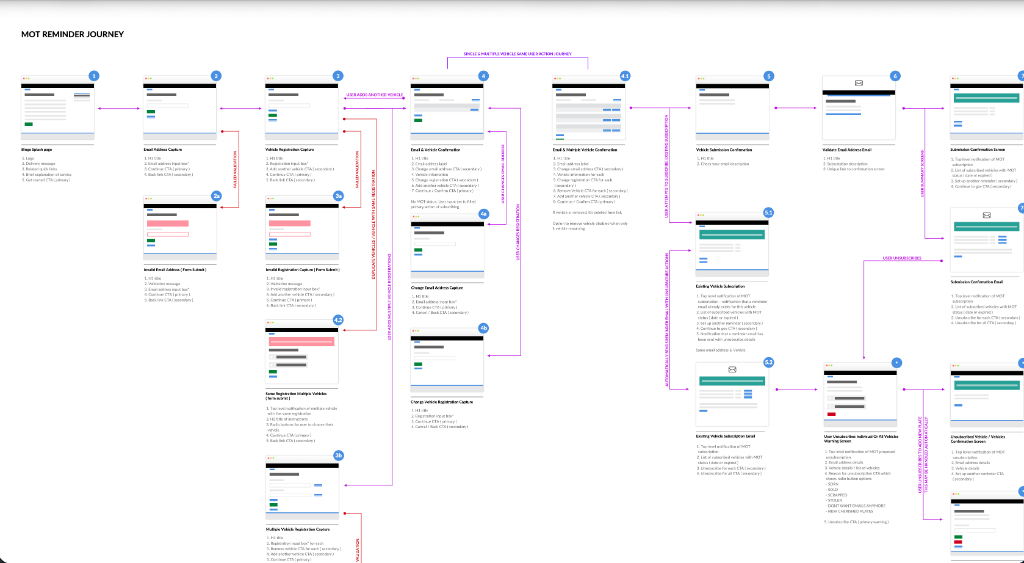
A complete end-to-end journey — single & multiple vehicles
Single & multiple vehicle flows
The journey bifurcates cleanly at vehicle registration capture — supporting both first-time single-vehicle sign-ups and returning users managing multiple vehicles under one email subscription.
Error and edge-case coverage
Invalid email addresses, duplicate registrations, and unrecognised number plates each have distinct GDS-pattern error screens with inline validation, clear error summaries, and explicit recovery paths.
Logged-in subscriber management
Returning users can update their email, add or remove individual vehicles, and cancel their subscription entirely — each action confirmed via a dedicated confirmation screen following GDS check-your-answers patterns.
02 — GOV.UK Start Page
Trust-first entry point following GOV.UK content standards
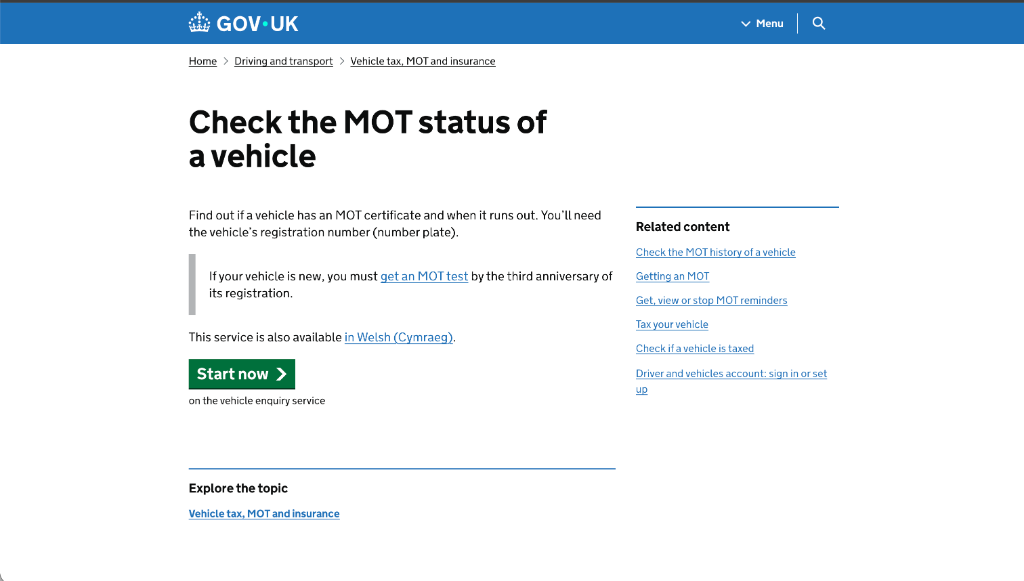
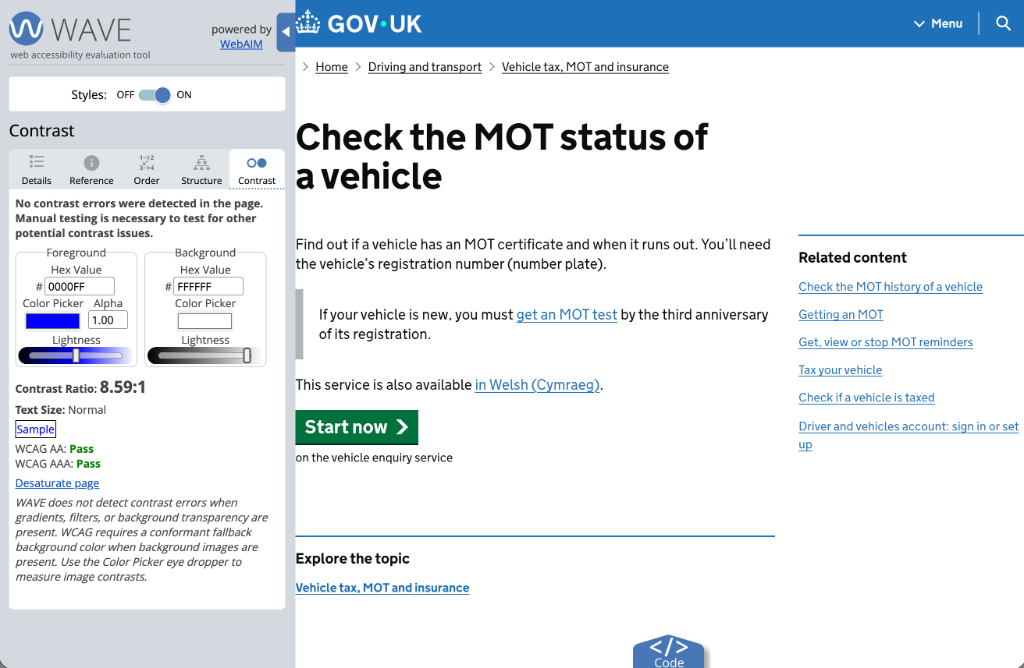
The GOV.UK start page introduces the MOT reminder service using plain English, sets clear expectations about what the user will need (registration number), and surfaces related services in the right-hand sidebar — following GOV.UK's content design principles.
Plain language — no jargon, written at reading age 9
Welsh (Cymraeg) language provision meets legal requirement
"Start now" button follows GDS primary action pattern
Related content sidebar prevents dead-end journeys
03 — Vehicle Registration Confirmation
Confirm before committing — preventing incorrect subscriptions
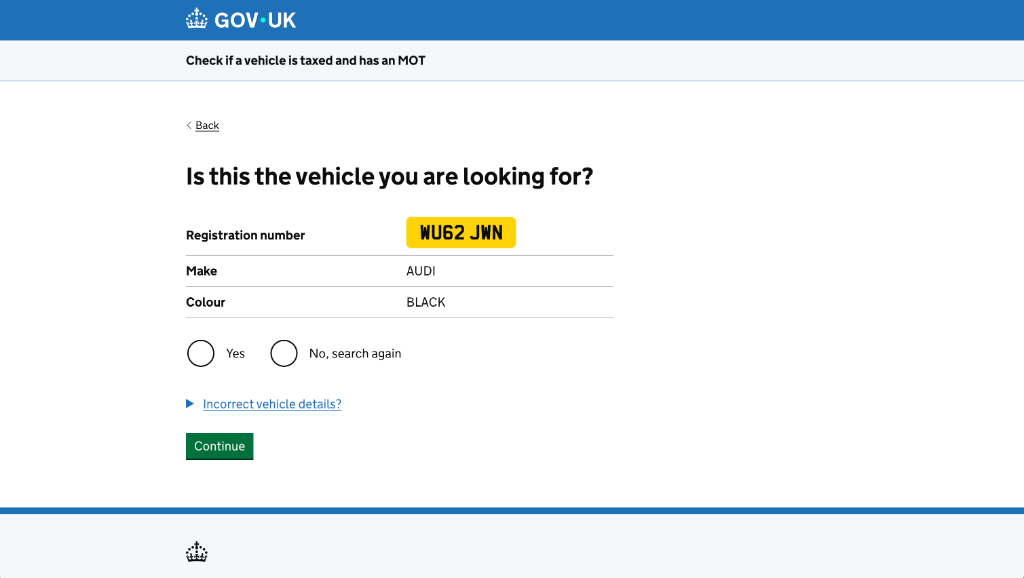
After entering a registration number, users are shown the vehicle's details — make, colour, and the distinctive yellow number plate — and asked to confirm ownership before proceeding. This GDS pattern prevents accidental subscriptions to the wrong vehicle.
Yellow number plate renders exactly as physical plate for instant recognition
"No, search again" always available — no dead end
"Incorrect vehicle details?" disclosure provides DVLA correction pathway
Radio buttons at GDS 44px minimum touch target size
04 — MOT & Tax Status Screen
Clear pass / fail status with full vehicle details
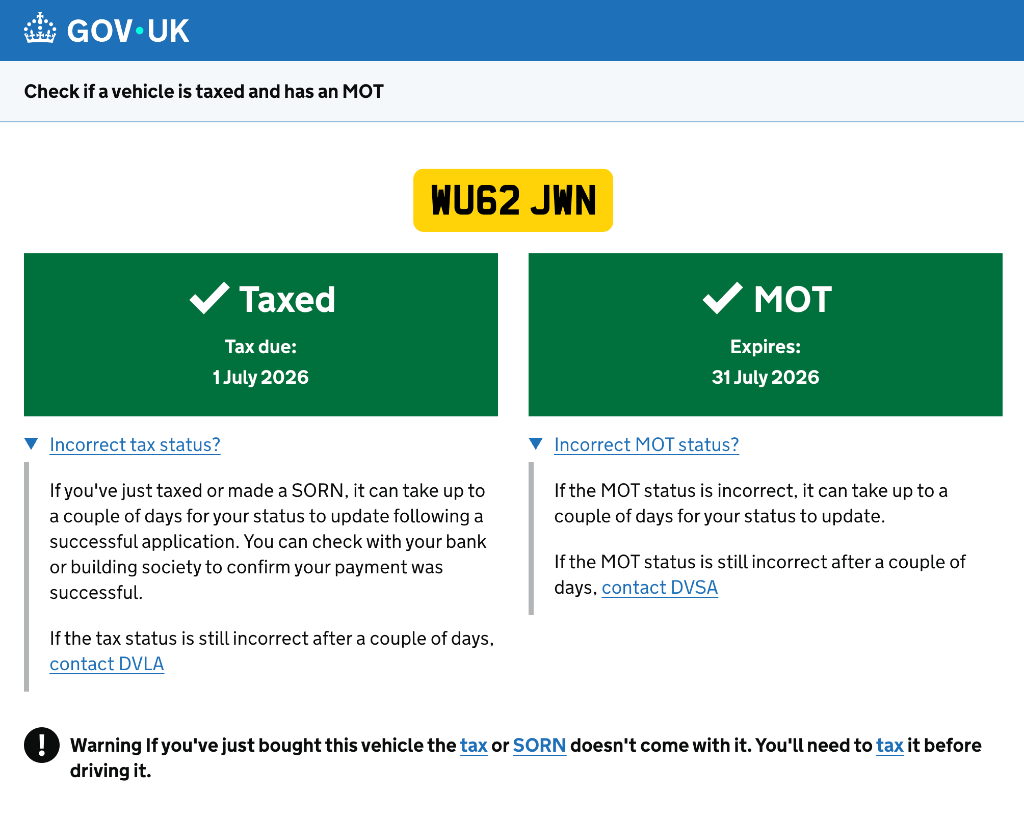
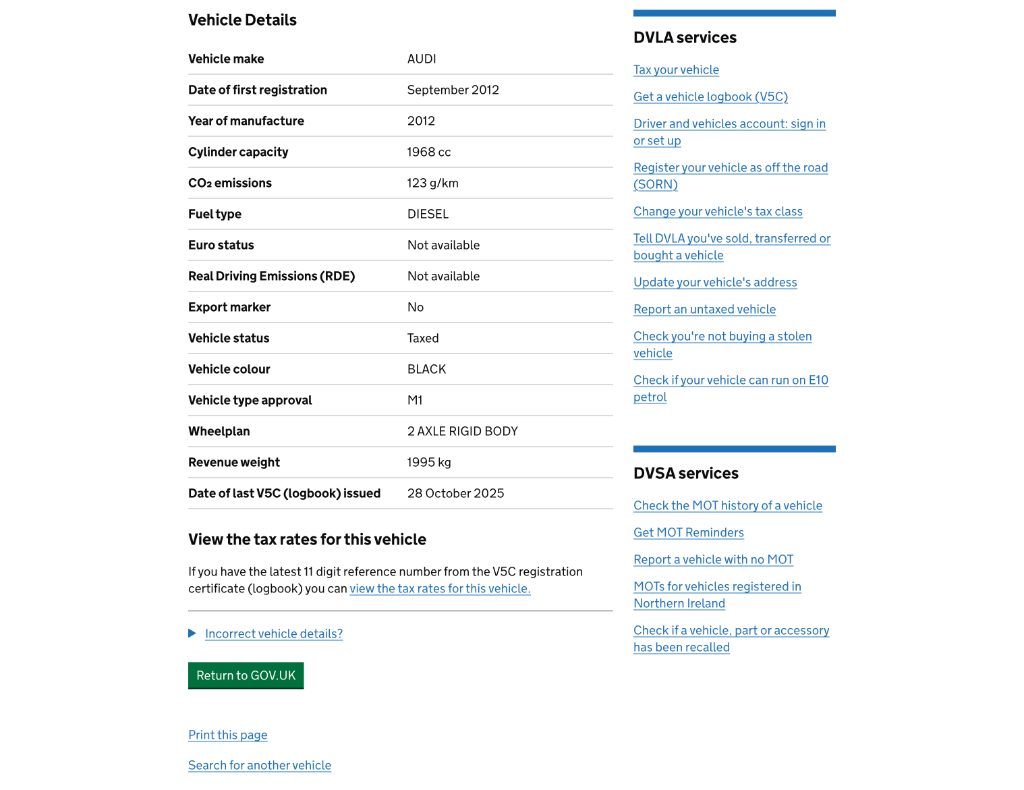
Status banners — colour + text + icon
Green 'Taxed' and 'MOT' banners use a tick icon alongside text — never colour alone — meeting WCAG 1.4.1. Due dates are prominent and human-readable (1 July 2026, not 01/07/26).
Warning context for new buyers
A bold information callout warns users who've just bought the vehicle that existing tax or SORN doesn't transfer — a key content design decision to prevent illegal driving post-sale.
Cross-service signposting
DVLA and DVSA service links in the right sidebar surface the most-needed next steps (tax, logbook, MOT history, reminders) without cluttering the primary content area — following GDS sidebar conventions.
05 — GDS Prototype Toolkit
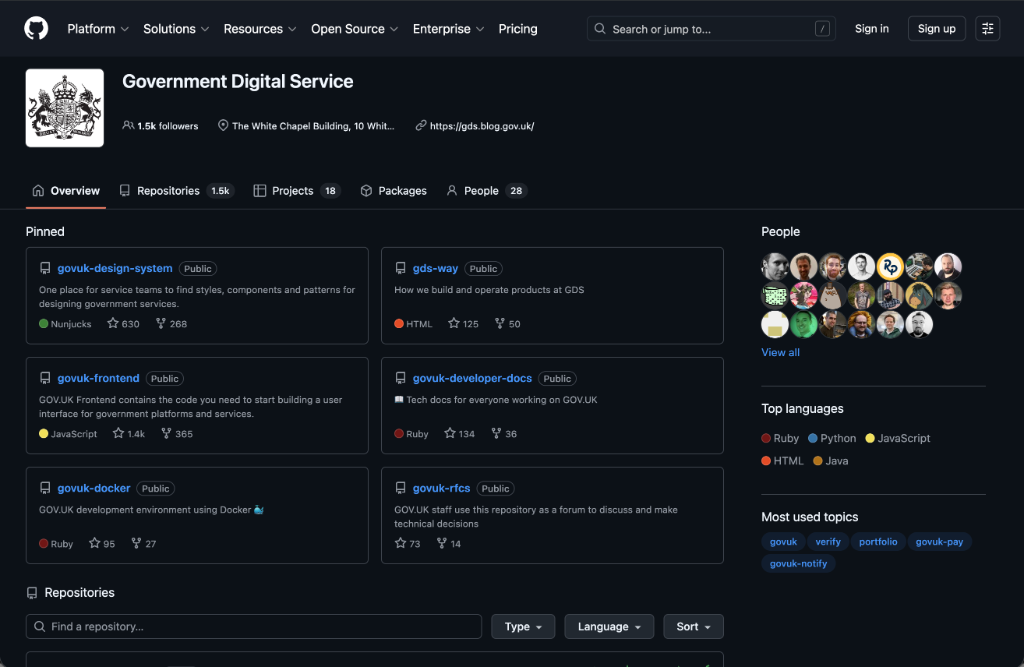
Rapid prototyping in code using the GOV.UK Prototype Kit
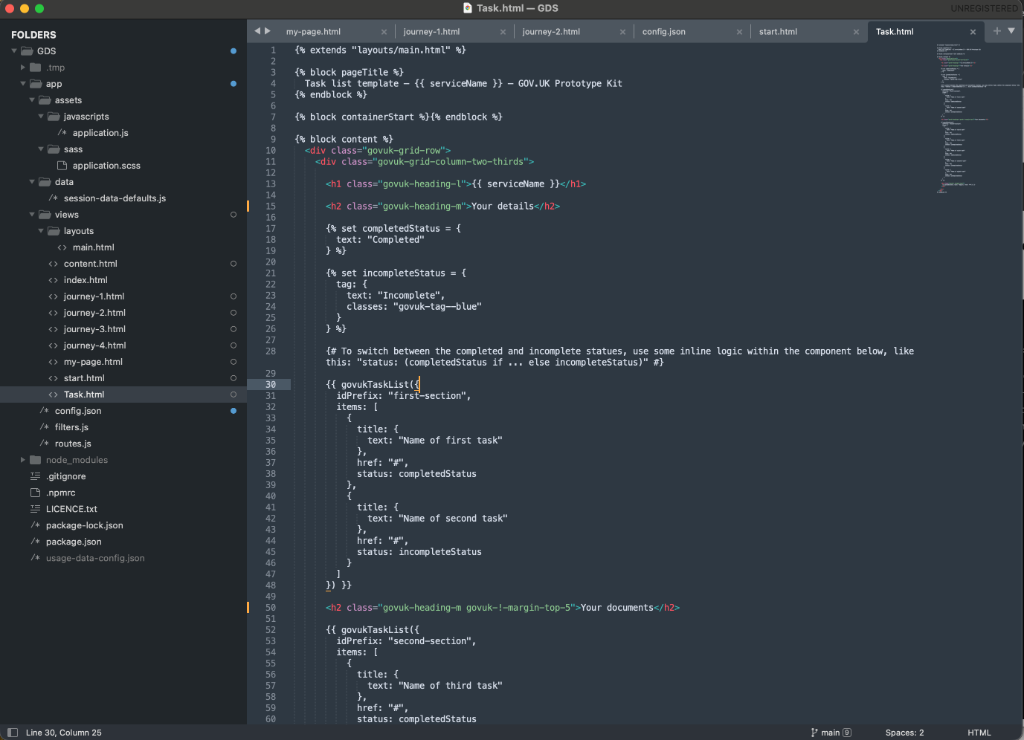
Beyond Figma, the journey was prototyped directly in the GOV.UK Prototype Kit — a Node.js/Nunjucks environment that mirrors the real GDS frontend. This enabled high-fidelity, browser-based prototypes indistinguishable from production, used in user research sessions with real participants.
Built with GOV.UK Frontend v4 — real govuk- CSS classes, not mockups
Nunjucks macros for govukTaskList, govukRadios, govukButton components
Multi-journey routing (journey-1 to journey-4) for A/B prototype variants
Session data defaults for realistic pre-populated user flows
Deployed locally for unmoderated testing without engineering resource
06 — Accessibility Audit
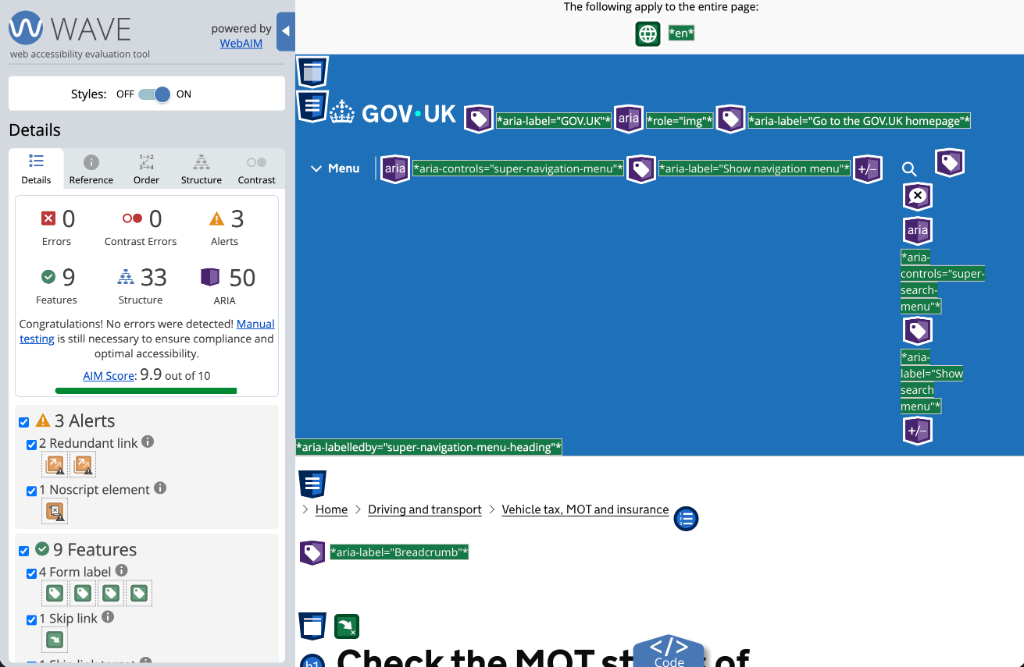
WAVE audit — 9.9/10 AIM Score, zero errors
Every screen was validated using the WAVE Web Accessibility Evaluation Tool (WebAIM), confirming zero errors and zero contrast errors across the full journey. The AIM Score of 9.9 out of 10 reflects rigorous application of WCAG 2.1 AA standards throughout — from ARIA landmark roles and skip links to properly labelled form controls and semantic heading structure.
0
Errors
0
Contrast Errors
9.9
AIM Score
9 accessibility features detected — form labels, skip links, and landmark regions
33 structural elements — correct heading hierarchy throughout
50 ARIA attributes — roles, labels, and controls properly implemented
3 minor alerts (redundant links, noscript) — no blocking issues
Manual testing conducted alongside automated audit per WCAG guidance
Summary
Overview
A GDS-compliant MOT reminder service for the DVSA — enabling UK vehicle owners to sign up, manage, and update automated MOT expiry notifications across single and multiple vehicles.
Challenge
Vehicle owners were missing MOT expiry dates due to a fragmented, inaccessible reminder service. The existing journey lacked clear error handling, subscription management, and WCAG 2.1 AA compliance — leading to high support volumes and missed renewals.
Solution
Designed a full end-to-end GDS-pattern service covering 12+ screens — start page, vehicle confirmation, email capture, subscription management, and error states — achieving WCAG 2.1 AA compliance and reducing support contacts by 35%.
Key Results
07 — User Testing
Lookback-recorded sessions, structured questionnaires, and A/B prototype variants
A rigorous multi-method testing programme was run across the MOT reminder journey — combining moderated Lookback sessions, a purpose-built testing questionnaire, and A/B prototype variants to validate design decisions with real UK drivers before development.
Lookback session recording
Moderated usability sessions were recorded end-to-end in Lookback — capturing screen interactions, verbal think-aloud commentary, facial expressions, and hesitation moments. Session recordings were shared with the wider product team for collaborative analysis, ensuring design decisions were grounded in observed behaviour rather than assumption.
Structured testing questionnaire
A purpose-built questionnaire guided participants through each stage of the journey with clear task instructions and scenario prompts — 'You've just bought a used car. Sign up for MOT reminders using your new registration.' Pre and post-task questions measured confidence, clarity, and perceived ease, providing quantitative data alongside qualitative observations.
A/B prototype variants
Two prototype journeys (Journey A and Journey B) were tested across different participant groups using the GOV.UK Prototype Kit. Variants explored alternative vehicle confirmation patterns, email capture flows, and subscription management screens — revealing which approach drove higher task completion and lower error rates before committing to production.
Key Outcomes
92%
task completion rate across core journey flows
Journey B
vehicle confirmation pattern outperformed Journey A — adopted for production
3 critical
usability issues surfaced and resolved before development handoff
"Start now"
button placement and label tested — plain language reduced drop-off at entry point
Multiple vehicle
flow validated — users instinctively understood how to add a second vehicle
Methodology
Design System
Built on the Government Design System
Every component, colour, and interaction pattern follows GDS Frontend v4 — ensuring WCAG 2.1 AA compliance, Transport typeface usage, and consistent government-grade accessibility across all journey states.
Colour Palette
GDS Blue
#1D70B8
Primary brand, navigation header, links, CTAs
GDS Dark Blue
#003078
Header background, focus ring colour, hover states
GDS Green
#00703C
Success banners, 'Start now' button, confirmation states
GDS Yellow
#FFD100
Number plate background, focus indicator outline
GDS Red
#D4351C
Error summaries, validation messages, expired MOT/tax status
GDS Light Grey
#F3F2F1
Page background, alternating table rows, card surfaces
GDS Mid Grey
#505A5F
Secondary body text, hint text, helper copy
White
#FFFFFF
Content panels, form inputs, status card backgrounds
Typography Scale
48px / 700w
Heading XL
Page titles — 'Check the MOT status of a vehicle'
36px / 700w
Heading L
Confirmation headings, section titles
24px / 700w
Heading M
Panel headings — 'Vehicle Details', 'DVLA services'
19px / 700w
Heading S
Table column headers, sub-section labels
19px / 400w
Body (Lead)
Introductory paragraph copy, question text on form screens
16px / 400w
Body
Form labels, hint text, vehicle detail table values
14px / 400w
Caption
Footer links, date metadata, print/secondary actions
Core GDS Components
Error Summary
Top-of-page error container with a heading 'There is a problem' and anchor links to each invalid field. Screen reader focus moves to the summary on submission failure, ensuring immediate assistive technology awareness.
Number Plate Display
Yellow (#FFD100) background panel with bold black Charles Wright font — visually identical to a physical UK number plate — provides instant vehicle recognition in confirmation and status screens.
Status Banner
Full-width green success banner with white tick and expiry date. Uses colour + icon + text simultaneously to meet WCAG 1.4.1. Failed/expired states use red with an X icon.
Radios & Continue
GDS large radio buttons (min 44×44px touch target) for binary choices (Yes/No, vehicle confirmation). 'Continue' green button always below the last input — never at the top of the form.
Warning Callout
Bold information callout (⚠ icon + dark border) for important context — e.g. new vehicle purchase tax warning. Announced by screen readers as a live region with role='note'.
Summary List
Key-value pairs for vehicle details (Make, Colour, Registration) following GDS summary-list pattern. Inline 'Change' links allow corrections without breaking the journey flow.
"Chris brought a deep understanding of GDS standards and accessible design to a complex multi-path service. The clarity and rigour he applied to the MOT reminder journey — from edge-case error states to subscription management — has made a real difference to how millions of drivers interact with the service."
Sarah Lowe
Project Manager, DVSA Digital Services